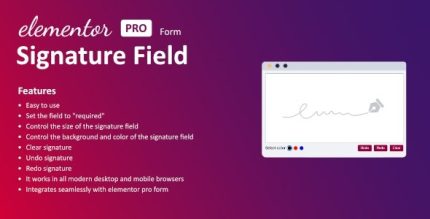
Signature Field for Elementor form 1.7.0

Signature Field for Elementor form adds a digital signature field to your WordPress contact forms, letting users sign electronically. It streamlines approvals and eliminates paper, improving conversion and legitimacy. Easy setup, seamless Elementor integration, and secure signatures—start collecting legally binding signatures today.
Description
Signature Field for Elementor form is a WordPress plugin that adds an electronic signature capture field to your Elementor-based contact forms. It lets visitors sign directly in the browser, so you can collect consent, approvals, and acknowledgements without printing, scanning, or emailing documents. By keeping everything inside your form workflow, it reduces friction for users and helps your submissions feel more complete and verifiable. If you’re building forms with Elementor, this plugin streamlines signature collection while keeping the experience simple to set up.
Main Features
- Electronic signature field — Adds a dedicated signature input to your Elementor form.
- Elementor Forms integration — Works with Elementor form elements inside WordPress pages and templates.
- Signatures captured with submissions — Includes the signature as part of the form submission data you receive.
- Easy setup for WordPress sites — Configure the signature field without complex form rebuilding.
- Streamlined approval workflows — Supports faster turnaround by collecting signed forms in one step.
- Secure signature capture — Helps protect the integrity of the signature collected through the form.
- Paperless document collection — Reduces manual handling by eliminating printing and scanning.
Benefits
- Smoother user experience — Visitors can sign right where they’re filling out the form.
- Higher completion rates — Fewer steps can lead to more completed submissions.
- Faster approvals — Signed documents arrive immediately, reducing back-and-forth.
- More trustworthy documentation — Signature capture helps improve legitimacy and record clarity.
- Less admin work — Eliminates printing, scanning, and file cleanup tasks.
Who is it suitable for?
- WordPress businesses collecting signed acknowledgements through contact forms
- Agencies and freelancers using Elementor for client form pages
- Organizations managing applications or approvals directly on their site
- Real estate and services teams that need signed intake forms
- Online service providers who want a more conversion-friendly form flow