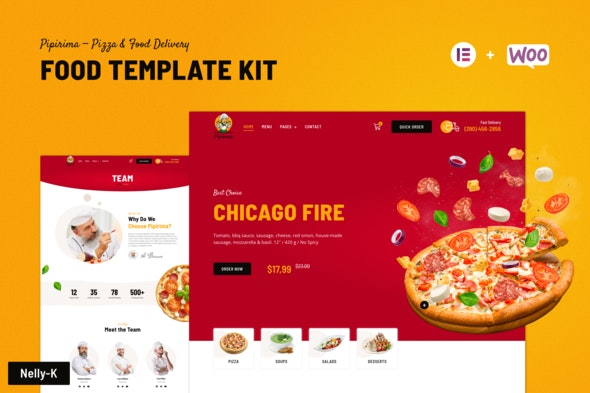
Pipirima – Pizza & Food Delivery Elementor Template Kit
| Cetegory: | Food & Drink |
|---|---|
| Full Preview: | Pipirima |
| More Info: | Themeforest |
| HOW TO INSTALL |
Description
Build the order and delivery food template perfection with Pipirima!
Pipirima Pizza Delivery Elementor Template Kit designed for food ordering and delivery of any kind including burger delivery, pizza delivery, delivery of various desserts and sweets.
The template contains layouts of the store at wooCommerce and is prepared for selling instant food online.
This Elementor Template Kit includes 19+ carefully crafted templates, has a Creative and Unique design with a 100% responsive layout, is retina-ready, and is easy to customize.
No coding needed! This template was created using Elementor and Elementor Pro!
Pipirima is the collection of stunning order and delivery food templates for Elementor builder. Template Kit includes a header, footer, and more than 33+ ready-to-use block templates. It is accessible and user-friendly and can be easily blended with third-party widgets and extensions to boost your site productivity.
Templates Include
- Home
- Menu
- About Us
- Our History
- Shop
- Single Product
- My Checkout
- Cart
- My Account
- Blog List
- Blog Grid
- Single Post
- Team
- Team Member
- Delivery
- Testimonial
- FAQ
- Contact
- 404 Page
- Header
- Footer
- Global Theme Style
Required Plugins
- Elementor
- WooCommerce (Optional, for e-store functionality)
Elementor Pro upgrade is required for some templates and features (not included)
Features list
- 19+ Beautifully Designed Templates
- 33+ Unique Sections
- Global Theme Styles included
- Using Elementor and Elementor Pro
- Professional and clean style
- Fully Responsive. Tested on real devices.
- No Coding Knowledge
- Live Drag & Drop Elementor Page Builder
- 100% Fluid & Fits any device perfectly
- Sticky Header
- Blog and Post Templates
- Nice and non-intrusive animations
- Extensive documentation
- Store build with WooCommerce
- Easy to Use and Customize
- Customizable Text, Background, Color, Image
- Google Fonts with 500+ Font families available
- 19+ Page Templates
- 40+ Block Templates
- Pixel Perfect Design
- Quick & Easy Installation & Setup
- Google Maps
- Free Google Fonts Used
- Cross-Browser Compatibility
- WordPress Multi-site Tested
- Quick, Dedicated and Professional Support
- Lifetime Free Updates
How to Use Template Kits:
- Install and Activate the Envato Elements plugin from Plugins > Add New in WordPress
- Download your kit file and Do not unzip
- Go to Elements > Installed Kits and click the Upload Template Kit button. You may also import automatically by clicking Connect Account to link your Elements subscription, then import under Elements > Template Kits.
- Check for the orange banner at the top and click Install Requirements to load any plugins the kit uses
- Click import on the Global Kit Styles first
- Click Import on one template at a time. These are stored in Elementor under Templates > Saved Templates.
- Go to Pages and create a new page and click Edit with Elementor
- Click the gear icon at lower-left of the builder to view page settings and choose Elementor Full Width and hide page title
- Click the gray folder icon to access My Templates tab and then Import the page youd like to customize.
If you have Elementor Pro, headers and footers may be customized under Theme Builder.
For further support, go to Elementor > Get Help in WordPress menu.
Notes
If you have any questions please feel free to email me via contact form here.
Sources
This Template Kit uses demo images from Envato Elements. You will need to license these images from Envato Elements to use them on your website, or you can substitute them with your own.
- https://elements.envato.com/ru/15-pizza-icons-4XEVX7
- https://elements.envato.com/image-W4UPR97
- https://elements.envato.com/ru/delicious-pizza-with-ingredients-VKQVHQX
- https://elements.envato.com/ru/salami-sausage-slice-WPRA2EQ
- https://elements.envato.com/ru/sliced-red-onion-rings-isolated-on-white-backgroun-LD78UQK
- https://elements.envato.com/ru/fresh-flying-basil-leaves-8AZ9JFS
- https://elements.envato.com/ru/margarita-pizza-isolated-on-white-P7WN4JU
- https://elements.envato.com/ru/delicious-vegetable-soup-in-a-plate-isolated-on-wh-TSHBZFA
- https://elements.envato.com/ru/fresh-salad-PLAFZJH
- https://elements.envato.com/ru/belgian-waffle-dessert-DPSXB4Y
- https://elements.envato.com/ru/pizza-box-mock-up-template-U3H7ZTV
- https://elements.envato.com/image-PSC8BDN
- https://elements.envato.com/image-PBURSKC
- https://pipirima-elementor.nelly-k.com/wp-content/uploads/2021/05/Line1.png
- https://pipirima-elementor.nelly-k.com/wp-content/uploads/2021/05/Line3.png
- https://pipirima-elementor.nelly-k.com/wp-content/uploads/2021/05/Line2.png
- https://elements.envato.com/image-6D9DQ88
- https://elements.envato.com/image-LZ4X5FB
- https://elements.envato.com/image-B29LHBN
- https://elements.envato.com/image-PNBJ94G
- https://elements.envato.com/image-XX7EJBK
- https://elements.envato.com/image-46XSSWV
- https://elements.envato.com/image-V8E8WUQ
- https://elements.envato.com/image-6NE33KH
- https://elements.envato.com/image-W5YQRJL
- https://elements.envato.com/image-JVBAEQ2
- https://elements.envato.com/image-EYKDMKE
- https://elements.envato.com/image-A7Z9NGT
- https://pipirima-elementor.nelly-k.com/wp-content/uploads/2021/09/Oval14.png
- https://elements.envato.com/image-QCYJTGH
- https://elements.envato.com/image-4WKLH5H
- https://elements.envato.com/image-YKDMKE2
- https://elements.envato.com/image-D5Y6UR2
- https://elements.envato.com/image-9RGCMF9
- https://elements.envato.com/image-SQ4VMGN
- https://elements.envato.com/image-Y3RS24K
- https://elements.envato.com/image-3KBLS99
- https://elements.envato.com/image-Z223ZQH
- https://elements.envato.com/ru/smiling-chef-in-hat-standing-with-crossed-arms-iso-YBAFYTS
- https://elements.envato.com/ru/handsome-african-american-chef-with-folded-arms-is-C8WVQAT
- https://elements.envato.com/image-LEK88H3
- https://elements.envato.com/ru/chef-plating-dish-in-restaurant-RA7B76A
- https://elements.envato.com/image-A7X9AMF
- https://elements.envato.com/image-FGAVZHG
- https://elements.envato.com/image-73YN8D2
- https://elements.envato.com/ru/delivery-concept-portrait-of-happy-african-america-HRXD75B
- https://elements.envato.com/image-PJWGLZ9
- https://elements.envato.com/image-PMBRVHW
- https://elements.envato.com/image-PMFY6BG
- https://elements.envato.com/image-PDA8SKF
- https://elements.envato.com/image-9GJPEQH
- https://elements.envato.com/image-PM9VPGH
- https://elements.envato.com/image-PMR3L9G
- https://elements.envato.com/image-K7QYR5H
- https://elements.envato.com/image-P529HQC
- https://elements.envato.com/image-PFBDY7C
- https://elements.envato.com/image-P3Y3GUP
- https://elements.envato.com/image-YQAN63R
- https://elements.envato.com/image-PU6GHZN
- https://elements.envato.com/image-PW4PXEK
- https://elements.envato.com/image-PGY27PH
- https://elements.envato.com/image-PAR393J
- https://elements.envato.com/image-TTBUVYT
- https://elements.envato.com/image-W9N687P
- https://elements.envato.com/image-XCCS4GG
- https://elements.envato.com/image-LKPX3H7
- https://elements.envato.com/image-ZFQKWPK
- https://elements.envato.com/image-9WCN5JP
- https://elements.envato.com/image-XJ6SSHE
- https://elements.envato.com/image-RWEKFTC
- https://elements.envato.com/image-S3QXNBA
- https://elements.envato.com/image-ZQ28CFX