Paid Memberships Pro Mobile Reports Dashboard 1.0.2
Description
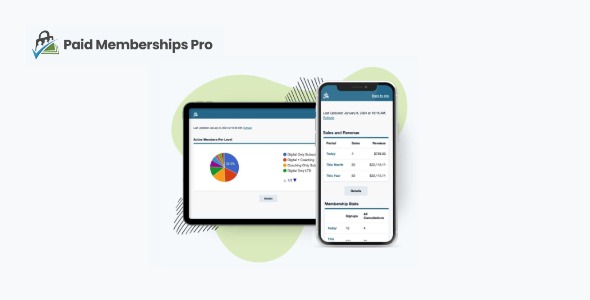
Paid Memberships Pro Mobile Reports Dashboard is a streamlined reporting dashboard built for membership sites using Paid Memberships Pro on WordPress. Instead of working inside the WordPress admin area, it loads outside of your dashboard experience as a PWA (progressive web app) designed for mobile and responsive screens.
This mobile-first approach helps you review key membership metrics on the go, without needing to switch contexts or hunt through admin pages. With a purpose-built interface, it supports quicker check-ins and more consistent visibility into member activity.
For site owners and teams who want analytics that work as reliably as the rest of their WordPress workflow, this plugin-style dashboard focuses on speed, clarity, and easy daily use—whether you’re on a phone, tablet, or other responsive device.
Main Features
- Mobile Reports Dashboard — Provides a dedicated reporting view for membership analytics.
- PWA (Progressive Web App) Experience — Runs as a PWA for streamlined access on responsive devices.
- Outside WordPress Admin — Loads outside the WordPress admin area to reduce friction during reviews.
- Responsive, Mobile-Optimized UI — Designed to display clearly across different screen sizes.
- Quick Access to Key Metrics — Helps you find important reporting information fast.
- Made for Paid Memberships Pro Sites — Tailored to work alongside membership dashboards built with Paid Memberships Pro.
- Easy to Set Up and Use — Focuses on simple setup and practical day-to-day navigation.
Benefits
- Faster decision-making — Reviewing metrics quickly helps you act sooner on what’s happening in your membership site.
- Better member insights — Easier access to reporting supports clearer understanding of member activity and performance.
- Improved mobile UX — A responsive PWA-style layout delivers a more comfortable experience on phones and tablets.
- Less admin switching — Accessing reports outside wp-admin reduces context switching while managing your site.
- More consistent reporting — On-the-go visibility supports regular check-ins, even when you’re away from your desk.
Who is it suitable for?
- Paid Memberships Pro site owners who review performance on mobile.
- Membership managers and community admins who need quick reporting access.
- Agencies managing multiple WordPress membership websites.
- Operators of online courses, memberships, and gated content platforms.
- Teams that prefer to monitor analytics without staying in the WordPress admin.
- Content and community leads who track engagement and membership activity regularly.