Modal Login Register Forgotten 2.0.5

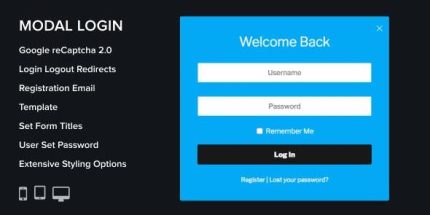
Modal Login Register Forgotten is a WordPress modal login form with two layouts, Google reCAPTCHA, and a redirect after login to streamline user access. Enjoy unlimited color styles, a built-in login widget, translation readiness, and comprehensive setup docs for quick, hassle-free integration.
Description
Modal Login Register Forgotten is a WordPress login modal plugin designed to streamline how visitors sign in and recover access on your site. It provides a smooth, popup-style login experience with Google reCAPTCHA included to help reduce unwanted login attempts. Two form layouts let you match the modal presentation to your site’s design preferences.
After a successful login, the plugin can redirect users to a destination you define, supporting a more focused user flow. It also includes a built-in login widget, unlimited color styling options, and translation readiness using Poedit, so you can adapt the interface quickly. Setup is guided by step-by-step documentation for installation and configuration.
Main Features
- Modal login form — Displays login/register content in a modal window for a smooth on-page experience.
- Two form layouts — Choose between different modal form arrangements to fit your UI.
- Google reCAPTCHA — Adds verification to help protect login submissions.
- Redirect after login — Sends users to a specific destination once they are authenticated.
- Unlimited color styles — Apply flexible color styling options to match your theme.
- Login widget — Add the login interface via a WordPress widget where needed.
- Translation ready — Includes translation workflow instructions for Poedit to localize text.
- Step-by-step documentation — Provides clear guidance for installation and setup.
- Regular updates — Kept current for compatibility with the latest WordPress versions.
Benefits
- Streamlined sign-in — Reduces friction by keeping users in context with a modal login flow.
- More secure logins — reCAPTCHA helps lower the risk of automated login attempts.
- Better user flow — Redirect-after-login improves navigation by taking users where they need to go next.
- Consistent styling — Unlimited color options help the modal match your existing site branding.
- Faster setup — Documentation and a built-in widget support easier implementation.
- Localized experience — Translation readiness supports multilingual UX for broader audiences.
Who is it suitable for?
- WordPress site owners who want a modal login experience.
- WooCommerce store administrators looking to simplify customer sign-in.
- Agencies building multiple WordPress client sites with consistent UX.
- Content creators managing member areas and account access.
- Community or membership websites that need reliable login and redirect flow.
- Internationalized sites that require Poedit-based translations.