Kimchi – Asian Restaurant & Cafe Elementor Template Kit
| Cetegory: | Food & Drink |
|---|---|
| Full Preview: | Kimchi |
| More Info: | Themeforest |
| HOW TO INSTALL |
Description
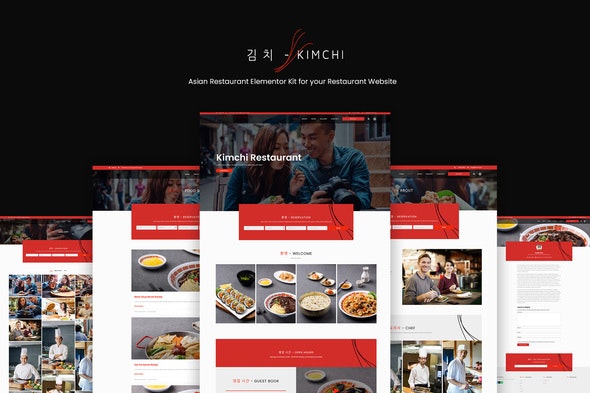
Kimchi is Asian Restaurant elementor kit for your project. The color is the compliment of the color of Kimchi mix with Modern Web Design. Kimchi is powered with Hello theme, Wordpress and Elementor, therefore it is light and easy to use. This theme also load with awesome feature such blog post, blog archive, gallery, 404 Page, Search Result Page, Counter, and Testimonial, Video. You may also add Shop Page if you like. Get Kimchi Elementor Kit now and start run your Restaurant Business.
Templates :
- Homepage 1
- About Us Pages
- Blog Page
- Gallery Page
- Post Archive Page
- Single Post Page
- 404 Page
- Search Result
- Contact Pages
Sections :
- Video Popup
- Login Popup
- Search Icon
- RSVP Popup
Required Plugins (will be installed automatically) :
- Elementor
- ElementsKit Lite
- Essential Addons
This kit requires the upgraded Elementor Pro version
How to Install:
- Install and Activate the Envato Elements plugin from Plugins > Add New in WordPress
- Do not unzip
- Go to Elements > Installed Kits and click the Upload Template Kit button.
- Before importing a template, ensure the Install Requirements button is clicked to activate required plugins
- For best results, do not import more than one template at a time.
Images:
This Template Kit uses demo images from Envato Elements. You will need to license these images from Envato Elements to use them on your website, or you can substitute them with your own.
- https://elements.envato.com/asian-couple-enjoy-chinese-food-and-watching-pictu-Z8HETH2
- https://elements.envato.com/asian-couple-enjoy-chinese-food-and-watching-pictu-UM766FD
- https://elements.envato.com/young-asian-couple-enjoy-chinese-food-at-cafe-PNXQVFU
- https://elements.envato.com/korean-snack-foodsstreet-food-PKF7L26
- https://elements.envato.com/korean-snack-foodsstreet-food-P22RCW5
- https://elements.envato.com/korean-snack-foodsstreet-food-PBR3YQF
- https://elements.envato.com/korean-snack-foodsstreet-food-PD3P9KH
- https://elements.envato.com/korean-snack-foodsstreet-food-P4Z3GPW
- https://elements.envato.com/korean-snack-foodsstreet-food-P6C8KBE
- https://elements.envato.com/korean-snack-foodsstreet-food-PKQDGND
- https://elements.envato.com/korean-snack-foodsstreet-food-PG6TCTT
- https://elements.envato.com/korean-beauty-QWTNF7S
- https://elements.envato.com/smiling-asian-guy-looking-happy-at-camera-cross-ar-4BKFZNZ
- https://elements.envato.com/asian-man-listening-to-music-with-earphones-5NTY2C2
- https://elements.envato.com/korean-snack-foodsstreet-food-P4AUGMX
- https://elements.envato.com/cooking-process-in-an-asian-restaurant-cook-is-fry-TKZKMAL
- https://elements.envato.com/cooking-process-in-an-asian-restaurant-cook-is-fry-5MVZAPP
- https://elements.envato.com/cooking-process-in-an-asian-restaurant-cook-is-fry-LXXJ95R
- https://elements.envato.com/cooking-process-in-an-asian-restaurant-cook-is-fry-QASHS6Y
- https://elements.envato.com/clients-in-chinese-food-restaurant-QTYGHWA
- https://elements.envato.com/asian-mature-chef-in-the-kitchen-PXSH4U5
- https://elements.envato.com/asian-successful-chef-in-the-kitchen-63TSEPU
- https://elements.envato.com/an-asian-chef-working-with-a-roasting-pan-of-mushr-HCSQDHC
- https://elements.envato.com/two-chefs-working-at-a-counter-at-a-japanese-sushi-3V8WQTW
- https://elements.envato.com/close-up-of-a-confident-smiling-young-asian-woman-FA9KPSN
- https://elements.envato.com/asian-couple-enjoy-chinese-food-and-watching-pictu-RCHDHPM
- https://elements.envato.com/asian-couple-are-eating-at-chinese-cafe-H9X99HT
- https://elements.envato.com/asian-couple-are-eating-at-chinese-cafe-KG94S3K
- https://elements.envato.com/young-man-sitting-at-a-table-in-an-asian-fast-food-3GUFEAJ
- https://elements.envato.com/young-woman-enjoy-meal-in-chinese-restaurant-D7P9KFL
- https://elements.envato.com/cheerful-mother-and-daughter-in-restaurant-2GZLUCJ
- https://elements.envato.com/confident-asian-chef-at-the-restaurant-5FD92MV