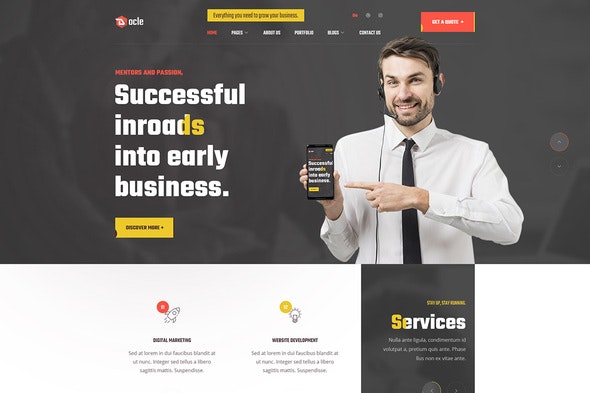
Docle – Digital Agency Services Template Kit
| Cetegory: | Business & Services |
|---|---|
| Full Preview: | Docle |
| More Info: | Themeforest |
| HOW TO INSTALL |
Description
Version 1.0.0 WordPress 5.x tested
Docle Digital Agency Services Template Kit
Docle Digital Agency Services Template Kit is an Elementor Template Kit for quickly and easily creating websites for your business using the Elementor Page Builder plugin for WordPress. This kit has been optimized for use with the free Hello Elementor theme but may be used with most themes that support Elementor.
The popular Elementor Page Builder for WordPress allows you to control your contents and layout more efficiently in a visual drag and drop builder. Our custom addon provides additional functionality and elements for creating dynamic sliders and tabs with any template. Changing any front-end style is simple and easy for anyone without any prior coding knowledge.
Required Plugins :
- Using Free Plugins (Elementor Pro is not required)
- Elementor Header, Footer & Blocks
- Themesflat Addons For Elementor
- MetForm
Kit Key Features:
- One Click Demo Import
- 02 Homepage Versions.
- Unique and Modern Style.
- Clear and Clean Layout
- Free Updates
- 24/7 Customer Support
- Cross browser compatible
- Built-in Header Footer
- Post Widget
- Carousel Slide Box ( Create sliders with anything )
- Responsive and Retina Ready
- Compatible with most WordPress themes
- Optimized for search engines
How to Install:
- Install the plugin from Plugins > Add New by searching for Template Kit Import. If you use FTP to install plugins, you can download it from https://wordpress.org/plugins/template-kit-import
- Once the plugin is activated, go to Tools > Template Kit
- Click on Upload Template Kit ZIP File to browse to your zip file and import.
- Your Template Kit preview will appear. Click View Installed Kit:
- An orange banner will appear if your kit requires additional free plugins. Click Install Requirements for details.
- A popup will appear listing the plugins your kit needs installed or activated. Click Install Requirements to proceed.
- Now you may begin importing your templates by clicking the Import Template button on the desired template..
How to import Metforms and content blocks
- Import the metform block templates
- Import the page template where the form appears and right-click to enable the Navigator
- Locate and select the Metform widget and click Edit Form. Choose New, then Edit Form. The builder will appear
- Click Add Template grey folder icon.
- Click My Templates tab.
- Choose your imported metform template, then click Insert (click No for page settings).
- Once the template is loaded, make any desired customizations and click Update & Close The form will appear in the template
- Click Update
How to Setup Slides & Tabs
- .Import the slide/tab block.You may import more than once and find copies under Templates > Saved Templates to customize.
- Import the template where the slides/tabs appear.
- Right click the page to open the Navigator and locate the Carousel or Tabs widget
- Select the slide or tab template from the dropdowns on the general tab of the element options.
Setup Global Header and Footer in Header Footer & Blocks plugin
- Import the header and footer template
- Go to Appearance > Header Footer and click Add New button
- Give it a title and select Header, Display on Entire Site and click Publish
- Click Edit with Elementor
- Click the gray folder icon to access My Templates tab and select the header template to import and Update.
- Repeat for Footer
- https://elements.envato.com/image-KB8AUBK
- https://elements.envato.com/image-6VNWDUQ
- https://elements.envato.com/image-P4ERG2Q
- https://elements.envato.com/image-BYRQE7T
- https://elements.envato.com/image-P5S8SQ6
- https://elements.envato.com/image-65QU92V
- https://elements.envato.com/image-M2RMVWV
- https://elements.envato.com/image-8610834
- https://elements.envato.com/image-8623011
- https://elements.envato.com/image-8B5GUUL
- https://elements.envato.com/image-29CUGFW
- https://elements.envato.com/image-UXX92C8
- https://elements.envato.com/image-FCMMJSS
- https://elements.envato.com/image-U6MWRKJ
- https://elements.envato.com/image-UAP7FZD
- https://elements.envato.com/image-6QFGRJG
- https://elements.envato.com/image-FCLJA7N
- https://elements.envato.com/image-4QRTVH9
- https://elements.envato.com/image-HBZ3SLA
- https://elements.envato.com/image-2VDVR29
- https://elements.envato.com/image-56H7A6Y
- https://elements.envato.com/image-KLYRRSA
- https://elements.envato.com/image-M2YBAGZ
- https://elements.envato.com/image-PKDLHGS
- https://elements.envato.com/image-P2LVBJQ
- https://elements.envato.com/image-924KX57
- https://elements.envato.com/image-7730205
- https://elements.envato.com/image-30FB230