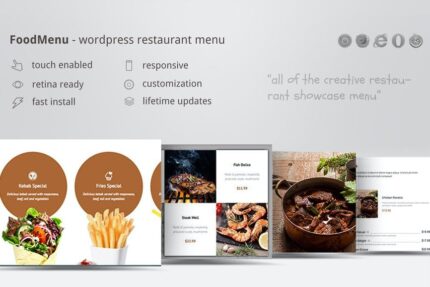
Creative Restaurant Menu Showcase WooCommerce 1.2

Creative Restaurant Menu Showcase WooCommerce lets you display a mouth-watering restaurant menu on your WordPress site with five display modes and four skins for endless customization. Its clear, modern design improves user experience and boosts conversions by guiding guests to popular dishes. Effortless WooCommerce integration and responsive layouts are an extra win.
Description
Creative Restaurant Menu Showcase WooCommerce is a WordPress plugin designed to present your restaurant menu in a visually engaging way. It helps you solve the problem of low engagement by making your offerings easy to scan on both desktop and mobile. With five display modes and four skins, you can match the menu layout to your brand style without rebuilding pages. For WooCommerce users, the menu integrates with your store flow so guests can browse items with less friction. The result is a clearer, modern presentation that supports better user experience and stronger conversion paths.
Main Features
- Five display modes — Choose from multiple ways to present your menu content on your site.
- Four menu skins — Switch between different visual skins to match your restaurant branding.
- Creative menu layouts — Display items in a clear, modern style that improves readability.
- Responsive presentation — Keep the menu usable and attractive across screen sizes.
- WooCommerce integration — Connect your menu showcase to your WooCommerce setup for smooth browsing.
- Customization-focused design — Combine modes and skins to create multiple variations for your pages.
- Conversion-oriented structure — Organize menu content to guide visitors toward popular dishes.
Benefits
- Higher engagement — Visitors can find menu details faster due to clearer formatting.
- Better UX on mobile — Responsive layouts reduce bounce on phones and tablets.
- More confident ordering — A structured menu helps guests choose from your most relevant options.
- Stronger conversion paths — Guests move through your menu with less friction, supporting improved checkout interest.
- Effortless visual updates — Swapping skins and modes makes it easier to refresh your menu presentation.
Who is it suitable for?
- Restaurants and cafés showcasing daily menus online
- WooCommerce stores selling food items or meal bundles
- Website owners who want a modern WordPress menu layout
- Marketing teams creating menu-focused landing pages
- Agencies supporting multiple restaurant clients