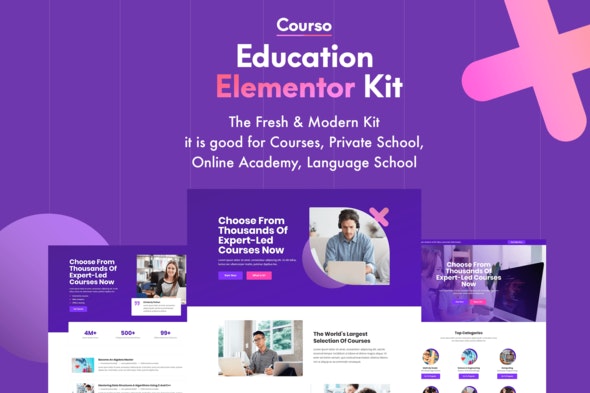
Courso – Online University & Courses Elementor Template Kit
| Cetegory: | Education |
|---|---|
| Full Preview: | Courso |
| More Info: | Themeforest |
| HOW TO INSTALL |
Description
Courso fresh & modern Education Elementor Kit. It works for: courses, preschool, primary school, secondary school, high and higher education. Also for college, university or academy, informal learning, institute.
Furthermore, it is good for distance private schools, home-learning, tutoring, teaching, language school, course, class, training. Also for traditional public school, charter school, boarding school, virtual self-learning.
Main Features
- 10 Elementor Templates
- True no-code customization with drag and drop visual builder
- Customize fonts and colors in one place or fine-tune on individual elements
- Modern, professional design
- Fast-loading
- Works with most Elementor themes.
Kit Includes:
- Home 1 Template
- Home 2 Template
- Home 3 Template
- Home 4 Template
- About Us
- Contact Us Page
- Courses Page
- Courses 2
- Course Page
- Pricing Page
Elementor Pro upgrade is required for some templates and features (not included)
Fonts:
- Open Sans
- Poppins
How to Use Template Kits:
- Install and Activate the Envato Elements plugin from Plugins > Add New in WordPress
- Download your kit file and Do not unzip
- Go to Elements > Installed Kits and click the Upload Template Kit button. You may also import automatically by clicking Connect Account to link your Elements subscription, then import under Elements > Template Kits.
- Check for the orange banner at the top and click Install Requirements to load any plugins the kit uses
- Click import on the Global Kit Styles first
- Click Import on one template at a time. These are stored in Elementor under Templates > Saved Templates.
- Go to Pages and create a new page and click Edit with Elementor
- Click the gear icon at lower-left of the builder to view page settings and choose Elementor Full Width and hide page title
- Click the gray folder icon to access My Templates tab and then Import the page youd like to customize.
If you have Elementor Pro, headers and footers may be customized under Theme Builder.
Detailed Guide: https://help.market.envato.com/hc/en-us/articles/900000842846-How-to-use-the-Envato-Elements-WordPress-Plugin-v2-0
For further support, go to Elementor > Get Help in WordPress menu.
This Template Kit uses demo images from Envato Elements. You will need to license these images from Envato Elements to use them on your website, or you can substitute them with your own.
- https://elements.envato.com/clever-young-manager-using-touchpad-while-sitting-LTEZZEA
- https://elements.envato.com/playing-and-learning-together-PRP2EQW
- https://elements.envato.com/teenager-people-at-the-national-flags-board-P26C52C
- https://elements.envato.com/woman-learning-english-with-language-application-H6J2BPS
- https://elements.envato.com/select-language-learning-translate-languages-or-PSLPWDD
- https://elements.envato.com/two-hands-holding-a-round-speech-bubble-on-blue-PDPTURQ
- https://elements.envato.com/young-students-thoughtfully-working-on-study-BMKYRN2
-
https://elements.envato.com/colorful-wooden-alphabet-box-set-PXC8356
- https://elements.envato.com/using-programming-language-for-coding-X5Q8ZRM
- https://elements.envato.com/children-learning-spanish-language-PED2FG3
- https://elements.envato.com/group-study-in-university-library-PNPFBDK
- https://elements.envato.com/excited-man-with-a-happy-expression-PMEBK4H
- https://elements.envato.com/to-look-confident-for-me-the-first-priority-P3N2T73
- https://elements.envato.com/attractive-female-face-with-short-hair-PS3VF6W
-
https://elements.envato.com/image-S7NA6NZ
- https://elements.envato.com/portrait-of-caucasian-woman-against-brick-wall-P77RWQD
-
https://elements.envato.com/friends-discussing-school-project-on-laptop-at-caf-FVB5DSE
- https://elements.envato.com/experiments-in-a-chemistry-lab-conducting-an-P6H2MMS
- https://elements.envato.com/pointing-at-student-YNHLT8F
-
https://elements.envato.com/lesson-of-english-language-W89GPJX
- https://elements.envato.com/image-P5GWU9L
-
https://elements.envato.com/image-PESV4KM
- https://elements.envato.com/beautiful-blonde-seriosly-young-woman-WQ6YWNM
- https://elements.envato.com/successful-businessman-sitting-thinking-P4JVQUF
- https://elements.envato.com/attractive-business-woman-YHLCTUZ
-
https://elements.envato.com/smiling-creative-professional-having-coffee-in-P7XTU6K
- https://elements.envato.com/image-5DEU3VT
-
https://elements.envato.com/image-PN4GB3Z
-
https://elements.envato.com/image-Z8PFWB5
- https://elements.envato.com/image-PUFGSE8
Logos: 100 Minimal Logos Premium Edition (https://elements.envato.com/100-minimal-logos-premium-edition-R68V87)**