Contact Form 7 Conditional Logic 2.8.3
Contact Form 7 Conditional Logic lets you tailor Wordpress forms by dynamically showing or hiding fields, sections, pages, or the submit button based on user input. It delivers a cleaner form with higher conversions by collecting only relevant data. Easy setup, seamless integration, and a smoother user experience.
Description
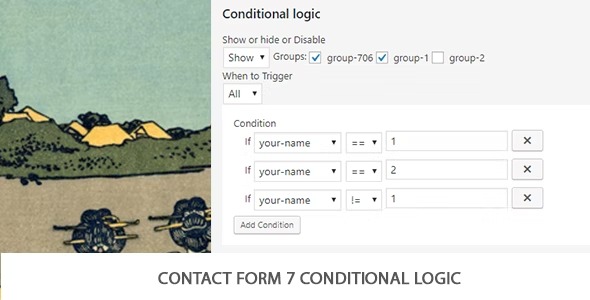
Contact Form 7 Conditional Logic is a WordPress plugin that helps you tailor Contact Form 7 forms based on what visitors enter or select. Instead of showing the same questions to every user, it applies conditional groups—rule sets that dynamically change the form layout in real time.
With this plugin, you can show or hide specific fields, sections, pages, or even the submit button depending on the answers provided. The result is a cleaner, more focused form experience that collects only the information that matters for each scenario.
For WordPress site owners, agencies, and teams building lead capture or inquiry flows, it supports easier form management and smoother user journeys, helping reduce confusion and improve completion rates.
Main Features
- Conditional groups — Create rule sets that determine which parts of a form should appear.
- Rule-based visibility — Show or hide fields based on user input and selections.
- Conditional sections — Toggle grouped sections to keep long forms organized and relevant.
- Multi-page control — Reveal or skip form pages based on answers, supporting guided flows.
- Submit button logic — Control when the submit button becomes available according to conditions.
- Smarter data collection — Request only the details needed for each path the user takes.
- Seamless Contact Form 7 integration — Works directly with Contact Form 7 form structures on WordPress.
- Easy setup — Configure conditions without redesigning your entire form layout.
Benefits
- Higher conversions — Fewer irrelevant questions can improve form completion rates.
- Better UX — Users see only the fields that match their needs, reducing friction.
- Cleaner submissions — Collect more relevant responses by guiding visitors through the right path.
- Reduced errors — Conditional submit logic helps prevent incomplete or mismatched entries.
- More scalable forms — Adapt one Contact Form 7 setup to multiple scenarios without duplicating forms.
Who is it suitable for?
- WooCommerce stores needing tailored inquiry or quote forms for different product/service types.
- Lead generation websites running Contact Form 7 forms for marketing and sales teams.
- Agencies managing multiple client form flows with branching requirements.
- Content-driven businesses that collect different visitor info based on article or topic interest.
- Organizations with multi-step contact requests that benefit from conditional sections or pages.