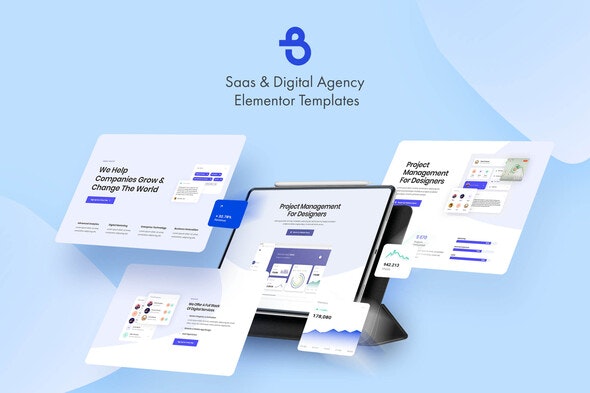
Burto – Saas & Digital Agency Elementor Template Kit
| Cetegory: | Business & Services |
|---|---|
| Full Preview: | Burto |
| More Info: | Themeforest |
| HOW TO INSTALL |
Description
Burto is a completely modern, feature-rich, professionally designed, fully responsive and multi-purpose Elementor templates.
It is suitable for all kinds of Agencies like Digital Agency, Creative Agency, Marketing Agency, Design Studios, Digital Marketing Agencies and other business service websites.
Main Features:
- 10 Elementor Templates
- 1 Click Installation
- 24/7 Customer Support
Kit Includes:
- Home 1 Template
- Home 2 Template
- Home 3 Template
- About
- Contacts
- Services
- Process
- Reviews
- Team
- 404 Error
Fonts:
- Poppins
- Open Sans
How to Use Template Kits:
- Install and Activate the Envato Elements plugin from Plugins > Add New in WordPress
- Download your kit file and Do not unzip
- Go to Elements > Installed Kits and click the Upload Template Kit button. You may also import automatically by clicking Connect Account to link your Elements subscription, then import under Elements > Template Kits.
- Check for the orange banner at the top and click Install Requirements to load any plugins the kit uses
- Click import on the Global Kit Styles first
- Click Import on one template at a time. These are stored in Elementor under Templates > Saved Templates.
- Go to Pages and create a new page and click Edit with Elementor
- Click the gear icon at lower-left of the builder to view page settings and choose Elementor Full Width and hide page title
- Click the gray folder icon to access My Templates tab and then Import the page youd like to customize.
If you have Elementor Pro, headers and footers may be customized under Theme Builder.
For further support, go to Elementor > Get Help in WordPress menu.
The following images shown in the kit are available for license from Envato Elements:https://elements.envato.com/handsome-businessman-walking-in-the-city-PF8WHN
https://elements.envato.com/image-UG93BVM
https://elements.envato.com/image-PG9NETA
https://elements.envato.com/image-SF8R2EA
https://elements.envato.com/image-D7QQYCU
https://elements.envato.com/image-P2TGYBT
https://elements.envato.com/image-PNNRW78
https://elements.envato.com/image-P4DTYKC
https://elements.envato.com/image-P7JPL65
https://elements.envato.com/image-PDZTLMB
https://elements.envato.com/image-BQL3TV8
https://elements.envato.com/image-9DV7XHT
Icons:
https://elements.envato.com/business-icons-XW3KEX
https://elements.envato.com/air-transport-thin-line-design-icons-set-AN8THJ
Logos:
https://elements.envato.com/30-premade-logos-minimal-edition-3R74KJ
https://elements.envato.com/clean-and-clever-insignias-badges-DGA5EV
UI Kits:
https://elements.envato.com/cards-ui-kit-dashboard-widgets-components-G6SA2K7
https://elements.envato.com/cards-ui-kit-admin-panel-dashboard-concept-GV3P2JM
Mockups:
https://elements.envato.com/clay-iphone-11-pro-mockup-clay-mockup-scenes-7UJVSVM
https://elements.envato.com/iphone-white-mockup-with-layers-TLCK7H