Artistant – Creative Photography Portfolio Elementor Template Kit
| Cetegory: | Creative & Design |
|---|---|
| Full Preview: | Artistant |
| More Info: | Themeforest |
| HOW TO INSTALL |
Description
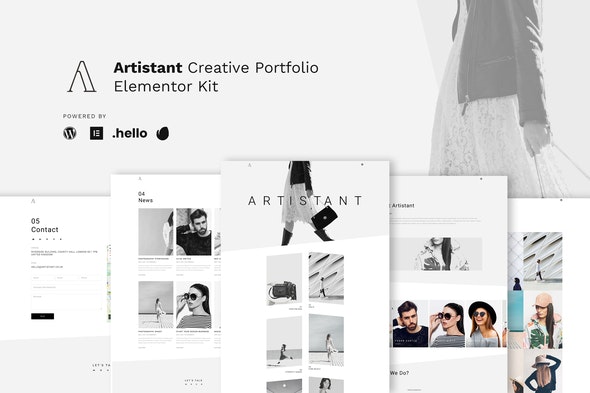
Artistant is multipurpose creative portfolio for elementor kit. It designs to load your art portfolio in minimalism way. This kit is easy to use and modify, just change the image inside of this kit and show your best art and portfolio on this minimal website template. Also this kit is light and fast, it is powered with hello theme and elementor.
Page Templates :
- Homepage
- About Page
- Portfolio
- Blog
- Single Blog
- Contact
- Error 404
Sections :
- Navigation Menu Pop Up
- Contact Pop Up
- Gallery Style 1 Pop Up
- Gallery Style 2 Pop Up
- Hero Slide with Custom Navigation
Required Plugins (will be installed automatically) :
- Elementor
- Premium Plugin for Elementor
- Happy Addon Plugin for Elementor
This kit requires the Elementor Pro upgrade for some templates and features (not included)
How to Install:
- Install and Activate the Template Kit Import plugin from Plugins > Add New in WordPress
- Do not unzip
- Go to Elements > Installed Kits and click the Upload Template Kit button.
- Before importing a template, ensure the Install Requirements button is clicked to activate required plugins
- For best results, do not import more than one template at a time.
This Template Kit uses demo images from Envato Elements. You will need to license these images from Envato Elements to use them on your website, or you can substitute them with your own.
How to Setup Slides & Tabs
1.Import the slide/tab block.You may import more than once and find copies under Templates > Saved Templates to customize. 2.Import the template where the slides/tabs appear. 3.Right click the page to open the Navigator and locate the Carousel or Tabs widget 4.Select the slide or tab template from the dropdowns on the general tab of the element options.
Configuring Header Popup
Import the popup templates and the header
Open the header template in the builder
Click on the icon that toggles the menu or search and click the wrench icon on the Popup setting in the link field and select the popup template to display. Thats it!
https://elements.envato.com/model-in-the-helmet-minimal-art-fashion-P5XHJWL
https://elements.envato.com/black-and-white-minimal-chevron-pattern-5YNUCQT
https://elements.envato.com/pretty-girl-in-fashionable-jacket-and-pink-cap-8MJ3ZT7
https://elements.envato.com/woman-in-a-minimal-beige-dress-mockup-D6HH5K9
https://elements.envato.com/portrait-of-a-young-woman-on-pastel-background-of--XVMBF6W
https://elements.envato.com/fashionable-portrait-of-smiling-elegant-brunette-g-6UGFMB6
https://elements.envato.com/fashionable-beard-man-portrait-using-retro-film-ca-Q8ZM3Y5
https://elements.envato.com/young-bearded-man-model-of-fashion-in-urban-backgr-DPT57XH
https://elements.envato.com/minimal-fashion-art-girl-in-moto-helmet-PQBPDLA
https://elements.envato.com/model-in-a-motorcycle-helmet-minimal-art-PZA6YNX
https://elements.envato.com/fashionable-girl-in-black-clothing-and-stylish-hat-AUDEYUW
https://elements.envato.com/fashionable-woman-hold-black-bag-GLXWZ3J
https://elements.envato.com/young-arabian-muslim-woman-in-casualwear-and-hijab-KUJAD64