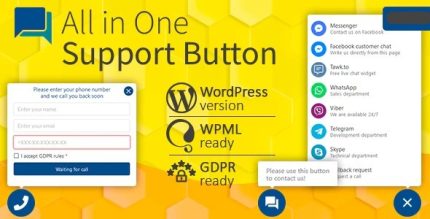
All in One Support Button 2.2.7 + Callback Request. WhatsApp, Messenger, Telegram, LiveChat and more

Description
All in One Support Button is a WordPress plugin that keeps a versatile support button visible on every page of your website. It helps visitors quickly reach you by aggregating multiple contact methods into a single, always-available touchpoint. Instead of hunting through menus or page footers, users can contact you at the moment they need help, right where they are browsing.
By centralizing support access, it helps reduce response delays and keeps the conversation moving. The plugin is quick to deploy and designed to be easy to customize, so you can match it to your site’s style and workflow. If you’re using WordPress for content, services, or ecommerce with WooCommerce, this kind of persistent support element can support stronger user engagement and better conversion journeys.
Main Features
- On-every-page support button — Displays the support entry point across your entire WordPress site.
- Multiple contact methods — Aggregates several ways to reach you into one button for easier discovery.
- Centralized contact hub — Routes visitors to your preferred support channels from a single location.
- Easy customization — Lets you adapt the support button to fit your site’s needs and branding.
- Quick to deploy — Designed to be set up and used without complex site restructuring.
- Consistent user experience — Maintains an always-available support option regardless of the page being viewed.
- Conversion-focused interaction — Keeps contact actions one click away to support engagement as users browse.
Benefits
- Faster user access — Visitors can contact you immediately instead of searching for contact details.
- Better UX for support — A consistent button across pages reduces friction and improves navigation convenience.
- Higher engagement — A visible support entry point encourages more users to reach out.
- Improved conversion paths — Quick contact can help turn questions into actions and next steps.
- Reduced response delays — Centralizing channels helps streamline how requests reach your team.
Who is it suitable for?
- WooCommerce store owners who want support available during browsing and checkout.
- Service-based WordPress websites that receive frequent customer questions.
- Content sites and blogs looking to increase engagement through an accessible contact option.
- Agencies managing multiple client sites and needing a consistent support touchpoint.
- Online businesses offering onboarding, troubleshooting, or FAQs across many pages.
- Membership and community platforms where users often need quick help access.