Laras Google Analytics Widget Pro 3.3.3

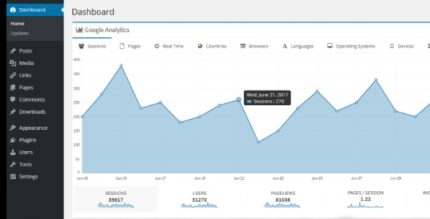
Lara’s Google Analytics Widget Pro brings a full-width analytics dashboard right into your WordPress admin, a dedicated WordPress widget giving you instant visibility into your site’s data. It also installs the latest Google Analytics tracking code across all sites, saving setup time and ensuring accurate tracking. Perfect for quick insights, effortless integration, and smarter decisions.
Description
Lara’s Google Analytics Widget Pro is a WordPress plugin that helps you monitor your website performance directly from the WordPress admin. It adds a full-width Google Analytics dashboard widget, so you can quickly review site data without switching between dashboards. The plugin also installs the latest Google Analytics tracking code across your WordPress sites, reducing the need for manual setup. This is especially useful when you want consistent tracking and faster access to insights for reporting, optimization, and content planning. If you manage multiple WordPress sites, the integrated approach keeps analytics configuration streamlined while supporting accurate data collection.
Main Features
- Full-width analytics dashboard widget — Displays Google Analytics information in a dedicated, prominent widget inside WordPress admin.
- Instant visibility in WP Admin — Gives you at-a-glance access to your site’s analytics data where you manage your content.
- Dedicated WordPress widget — Keeps analytics tools organized within the WordPress interface for easier day-to-day use.
- Latest Google Analytics tracking code integration — Automatically adds the most recent tracking code to your WordPress sites.
- Tracking applied across all sites — Ensures analytics code is installed consistently across the sites covered by your WordPress setup.
- Less manual configuration — Reduces time spent copying, editing, and pasting tracking scripts in templates or theme files.
- More consistent tracking — Helps maintain accurate data collection by avoiding missing or outdated tracking code.
- Focused workflow — Supports quicker decisions by combining admin management with analytics visibility.
Benefits
- Faster insights — Review analytics without leaving the WordPress admin, improving reporting speed.
- Better UX for admins — Keep monitoring and site management in one place for a smoother workflow.
- Improved data accuracy — Automatic installation of the latest tracking code reduces tracking gaps.
- Reduced setup effort — Less manual code handling saves time during launches and updates.
- More consistent measurement — Apply tracking consistently across sites to support reliable comparisons.
Who is it suitable for?
- WordPress site owners who want analytics visibility inside wp-admin.
- Websites with recurring updates where tracking must stay consistent.
- Digital agencies managing multiple WordPress client sites.
- Bloggers and content teams that rely on performance data for publishing decisions.
- Marketing teams running ongoing campaigns on WordPress.
- Multi-site WordPress setups that need consistent Google Analytics installation.