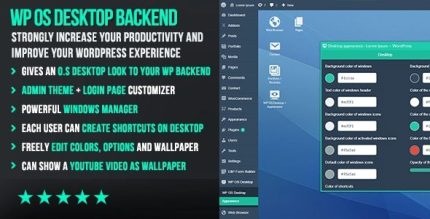
WP OS Desktop Backend 1.160

WP OS Desktop Backend delivers an OS-inspired WordPress backend, organizing admin pages like windows and letting you create desktop shortcuts with one click. This UX-first plugin boosts efficiency, speeds up workflow, and gives you a familiar desktop feel. A WordPress backend plugin designed for faster task access.
Description
WP OS Desktop Backend is a WordPress admin plugin that reshapes the backend into an OS-inspired desktop experience. Instead of searching through menus, you can organize key WordPress admin pages in a window-style layout for faster navigation. This UX-first approach is designed to reduce friction during daily tasks and help you focus on content and site management.
With one-click desktop shortcut creation, the plugin gives you quick access to the areas you use most. It’s a practical WordPress backend plugin for teams and creators who want a familiar desktop workflow while working inside WordPress and its admin screens.
Main Features
- OS-inspired backend layout — Presents the WordPress admin experience using a desktop-like interface.
- Window-style admin navigation — Helps you manage different admin pages as “windows” for clearer organization.
- Desktop shortcuts with one click — Creates direct shortcuts to frequently used admin areas.
- Quick access to admin screens — Minimizes time spent locating the right page in the backend.
- Improved task organization — Groups common workflows into an interface that mirrors how you work on desktop.
- Familiar desktop-style workflow — Supports an intuitive navigation pattern for faster onboarding.
- Better visibility of key sections — Makes it easier to keep important admin pages within reach.
- Works within WordPress admin — Applies the desktop UX concept directly to your existing WordPress backend.
Benefits
- Faster admin workflow — Reduces clicks and search time when switching between tasks.
- Lower cognitive load — Window-style navigation makes it easier to understand where actions live.
- Higher productivity — One-click shortcuts speed up repeat visits to important screens.
- Better UX for editors — A familiar desktop feel improves comfort for frequent users.
- More efficient daily management — Clear organization supports smoother, more consistent backend routines.
Who is it suitable for?
- WordPress site owners managing content and settings frequently
- WooCommerce store admins who need rapid access to backend tasks
- Editorial teams working across multiple admin pages daily
- Agencies managing many WordPress projects with repeat workflows
- Developers who switch between settings, posts, and tools throughout the day
- Content creators who prefer desktop-style navigation for the WordPress backend