Admin Bar Editor 1.0.4.0
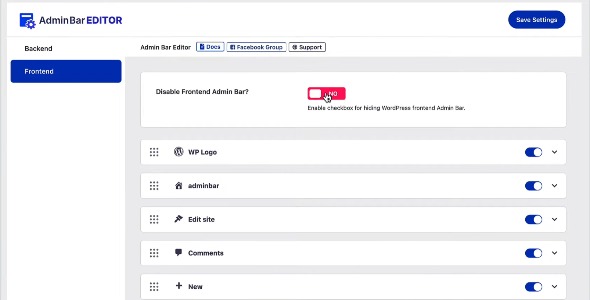
Admin Bar Editor simplifies your WordPress admin toolbar by letting you trim away clutter and keep only the menu items you use, boosting efficiency and focus. This WordPress plugin optimizes the admin bar for faster navigation and cleaner dashboards. A lightweight, easy-to-use solution that improves workflow—perfect for designers and developers who want a streamlined admin experience.
Description
Admin Bar Editor is a WordPress plugin that helps you simplify the WordPress admin toolbar (admin bar). Instead of seeing every default menu item and clickable link, you can trim the clutter and keep only the entries you actually use.
For designers, developers, and site builders working across themes, plugin stacks, and template kits, a cleaner admin interface improves day-to-day navigation. It streamlines your “command center” so you spend less time hunting for tools and more time working in the dashboard. The plugin is lightweight and easy to use, making it practical for ongoing workflow improvements.
Main Features
- Admin bar item trimming — Remove unused menu items and links from the WordPress admin toolbar.
- Selective visibility — Choose which parts of the admin bar remain visible for your workflow.
- Cleaner dashboard navigation — Reduce visual noise so the remaining shortcuts are easier to find.
- Focused admin experience — Keep frequently used actions within quick reach.
- Lightweight approach — Designed to be unobtrusive while you manage WordPress.
- Simple setup — Easy-to-use controls that fit naturally into the WordPress admin area.
- Improved toolbar usability — Optimized admin bar layout supports faster navigation during daily tasks.
- Works with existing WordPress setups — Apply the customization to the admin bar within your current site environment.
Benefits
- Faster access to tools — Fewer items on the admin bar helps you reach key actions quicker.
- Less distraction — Removing unused links reduces clutter and improves focus while working.
- Better workflow efficiency — Streamlined navigation cuts down repeated searching through the toolbar.
- Improved UX in the backend — A cleaner command center supports a more comfortable admin experience.
- More consistent dashboard use — The admin bar reflects your actual habits, not defaults you rarely touch.
Who is it suitable for?
- WordPress designers using page builders like Elementor
- Developers managing multiple themes, plugins, and settings
- Agencies handling many client dashboards
- Content teams that need quick access to common admin actions
- WooCommerce store admins who want a less cluttered backend
- Website owners maintaining a large plugin-driven site