Sigma Media Manager 1.7.4
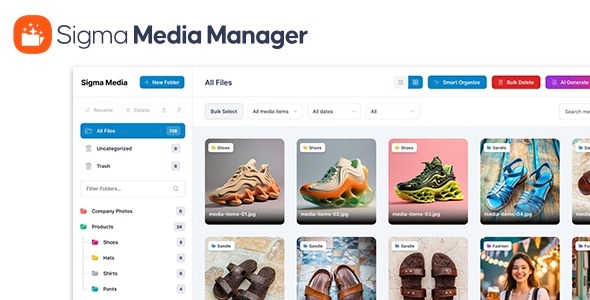
Sigma Media Manager streamlines your WordPress media library with folders, filters, drag-and-drop, and advanced controls for blistering-fast organization. Save time locating assets, improve site performance, and enjoy a user-friendly workflow with this WordPress plugin.
Description
Sigma Media Manager is a WordPress plugin designed to streamline your media library organization. Instead of scrolling through a long list of uploads, it helps you arrange files using folders and fast filters, so you can find assets quickly. With drag-and-drop workflow and advanced controls, managing images, documents, and other media becomes more efficient for everyday editing in WordPress.
By reducing the time spent locating the right file, Sigma Media Manager supports a smoother content creation process and contributes to better site performance through improved media handling. It’s a practical tool for anyone using WordPress who wants a cleaner library and a more user-friendly media workflow.
Main Features
- Folder-based media organization — Organize WordPress uploads into structured folders for easier browsing.
- Media filters — Narrow results quickly so you can locate specific files without manual searching.
- Drag-and-drop handling — Move and organize media using a simple drag-and-drop interface.
- Advanced controls — Manage library items with additional options beyond default WordPress behavior.
- Fast library navigation — Streamlined performance that helps keep organization and browsing responsive.
- User-friendly workflow — A more intuitive media management experience for editors and site admins.
- Cleaner asset access — Reduce time spent locating assets during page or post updates.
- Better day-to-day usability — Support consistent organization as your WordPress media library grows.
Benefits
- Faster asset discovery — Filters and folders help you find the right media quickly.
- Improved workflow — Drag-and-drop organization reduces friction during content updates.
- Better UX for editors — A clearer library structure makes everyday editing less frustrating.
- More efficient site maintenance — Advanced controls support consistent management as uploads increase.
- Performance gains — Faster navigation and smoother handling can reduce delays in media-heavy workflows.
Who is it suitable for?
- WooCommerce stores managing many product images and media uploads
- WordPress bloggers and content teams with frequent publishing
- Agencies running multiple WordPress client sites
- Website owners scaling assets over time
- Marketing teams updating landing pages and creative libraries
- Small businesses that want a more organized WordPress media workflow