MinervaKB Knowledge Base for WordPress with Analytics 2.0.9

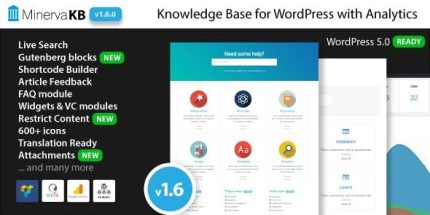
MinervaKB Knowledge Base for WordPress with Analytics helps you build and grow a smarter knowledge base with built-in analytics, live Ajax search, and frontend submissions. The main benefit is faster user self-service and better support insights, plus perks like search analytics, Gutenberg readiness, access restrictions, and a versatile shortcode builder, Type: WordPress.
Description
MinervaKB Knowledge Base for WordPress with Analytics is a knowledge base plugin built for organizing help content and improving how visitors find answers. It combines Ajax live search, article submissions from the frontend, and built-in analytics so you can see what users need and how they interact with your articles.
Designed to fit modern WordPress workflows, it’s Gutenberg ready, includes a shortcode builder, and supports structured content elements like FAQ and software version labels. With access restrictions, guest posting, attachments, and Google Analytics integration, it helps you streamline support and strengthen self-service experiences.
Main Features
- Ajax intuitive Live Search — Fast, live results with multiple themes.
- Analytics dashboard — Track views and likes/dislikes on weekly or monthly graphs.
- Search analytics — See what users searched for and which results they received.
- Shortcode builder — Create and place knowledge base elements without manual coding.
- Gutenberg ready — Works with the WordPress block editor for smoother publishing.
- Guest posting / Frontend submission — Allow users to submit articles from the frontend.
- Article attachments — Attach files to knowledge base entries for richer documentation.
- Content restriction — Restrict access by user role; show a login form and teaser to guests.
- FAQ module — Publish frequently asked questions as part of your knowledge structure.
- Google Analytics integration — Connect insights to your existing analytics setup.
Benefits
- Faster self-service — Live Ajax search helps visitors locate answers immediately.
- Better support decisions — Analytics reveal which topics and results need improvement.
- Higher engagement — Views and likes/dislikes show which articles users actually value.
- Improved relevance — Search analytics identify popular queries and mismatched results.
- More flexible knowledge management — Gutenberg support and a shortcode builder speed up updates and layouts.
- Controlled access — Role-based restrictions help keep internal or gated documentation secure.
Who is it suitable for?
- WooCommerce stores that need structured product and support documentation.
- WordPress blogs and editorial sites publishing troubleshooting guides.
- Agencies managing client knowledge bases with reusable templates.
- Online schools and training platforms with course help articles.
- SaaS teams documenting features and knowledge by software version.
- Content creators building searchable help centers for their audiences.