Toolbar Editor 1.5

Description
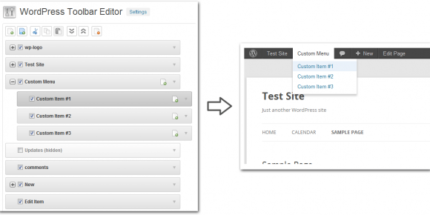
Toolbar Editor is a WordPress plugin that helps admins tailor the WordPress admin toolbar for a clearer, more focused workflow. It lets you hide unwanted toolbar items or groups, reorder elements with drag-and-drop, and fine-tune how each item appears. When you work across multiple sites, consistent toolbar configuration becomes hard without automation—this plugin addresses that with export and import.
Use it to rename toolbar titles, adjust item URLs, and update item CSS classes, making the toolbar match your site’s structure and branding. It also supports multisite (Network / Multisite) installations so changes can be applied consistently across the network. Toolbar Editor works with the Admin Menu Editor Pro requirement to provide these toolbar customization controls.
Main Features
- Hide toolbar items and groups — Remove specific elements from the admin toolbar.
- Drag-and-drop reordering — Change the order of toolbar items without manual coding.
- Edit item title — Rename titles to better reflect your admin workflow.
- Update item URL — Point toolbar items to the correct destinations.
- Modify CSS classes — Adjust CSS class settings for improved styling control.
- Create new toolbar items — Add custom entries to your admin toolbar.
- Export toolbar settings — Save your configuration for reuse.
- Import toolbar settings — Apply the same toolbar layout across other WordPress sites.
- Multisite support — Manage customization for Network / Multisite installations.
Benefits
- Cleaner admin UX — Less clutter helps editors and admins find what they need faster.
- Improved task flow — Drag-and-drop ordering puts priority actions at the top.
- Better consistency — Export/import helps standardize toolbar behavior across sites.
- More intuitive navigation — Renamed titles and updated URLs reduce confusion.
- Scalable customization — Multisite support makes network-wide management practical.
Who is it suitable for?
- WooCommerce store administrators managing multiple workflows
- WordPress multisite networks that need consistent admin toolbar layouts
- Agencies running client sites with standardized admin experiences
- Content teams and editorial departments with frequent back-end usage
- Developers who want toolbar structure aligned with custom admin tools
- Site owners maintaining several environments (e.g., staging and production)