Gravity Forms Image Choices 1.7.4
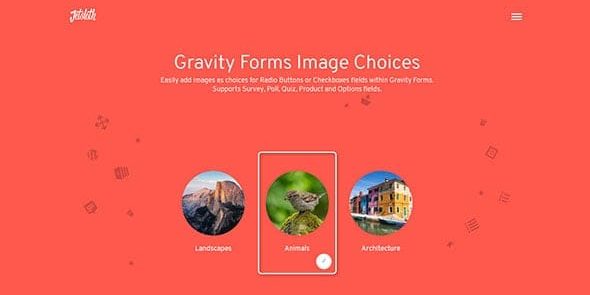
Gravity Forms Image Choices lets you add images as radio or checkbox options in WordPress forms, making selections visual and intuitive. It boosts engagement and conversions by turning surveys, quizzes, products, and options into stunning image-based choices. Lightweight plugin with seamless Gravity Forms integration, design-friendly and easy to use—explore the visual power today.
Description
Gravity Forms Image Choices is a WordPress plugin that enhances Gravity Forms by letting you use images as selectable options inside Radio Buttons and Checkboxes fields. Instead of typing image markup into field labels, you can attach visuals directly to each choice. This makes surveys, quizzes, and option lists easier to scan and understand, especially on mobile. When choices are visual, users can make selections faster with fewer errors, improving the overall form experience. The plugin is designed to fit naturally with Gravity Forms and typical WordPress workflows, including Elementor-built pages that embed forms.
Main Features
- Image choices for Radio fields — Add an image to each radio option so users select visually.
- Image choices for Checkbox fields — Display thumbnail-style images for multi-select checkbox options.
- Integrated with Gravity Forms — Works within the Gravity Forms editor for building your forms.
- Supports survey use cases — Use image options for questionnaires and audience feedback forms.
- Supports quiz-style questions — Make quiz answers more engaging by pairing choices with images.
- Supports product and option selections — Present visual choices for items, variants, or configurable options.
- No manual image markup in labels — Eliminate the need to embed image HTML inside checkbox or radio labels.
- Lightweight approach — Keeps the visual-choice enhancement focused on image-enabled selection fields.
Benefits
- Clearer user decisions — Visual options reduce ambiguity compared to text-only choices.
- Higher engagement — Attractive image-based selection can increase interaction with the form.
- Better UX for multi-choice — Users can compare options quickly, improving usability.
- Fewer selection mistakes — More intuitive visuals help prevent incorrect answers.
- Streamlined form building — Assign images to choices without custom label markup.
Who is it suitable for?
- WooCommerce stores using Gravity Forms for product options or add-ons
- Marketers running surveys and customer feedback forms
- Educators building quiz-style assessments
- Agencies creating form-driven landing pages with Elementor
- Content creators publishing interactive polls and choice-based experiences
- Web developers enhancing Gravity Forms for visual onboarding flows