Advanced Custom Fields Theme Code Pro 2.5.6

Description
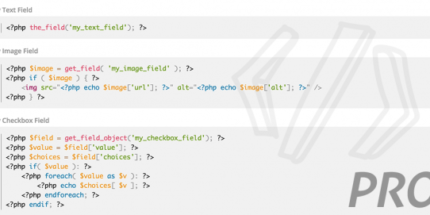
Advanced Custom Fields Theme Code Pro is an ACF add-on built for WordPress theme development. It helps you implement ACF field groups in your theme by automatically generating the code you need. Instead of manually translating field settings into template or theme syntax, you can view ready-to-use snippets in a dedicated Theme Code panel. The code appears directly beneath each Field Group’s settings, streamlining your workflow while supporting cleaner, more consistent development.
Designed for developers working with custom field-driven templates, this plugin reduces repetitive work and helps minimize small copy/paste and formatting mistakes. It supports smoother integration between ACF configuration and the theme code where those fields are rendered.
Main Features
- Theme Code panel — Displays generated implementation code in a Theme Code section for each ACF field group.
- Automatic code generation — Produces the PHP code needed to work with your configured ACF field groups in your theme.
- Inline placement under settings — Shows code immediately beneath Field Group settings for faster iteration.
- Ready-to-use snippets — Provides code you can paste into theme files to wire up custom field functionality.
- Field group to theme mapping — Keeps your ACF definitions and theme implementation aligned.
- Workflow acceleration — Cuts down manual steps when creating or updating theme integrations for ACF.
- Developer-friendly output — Helps standardize how field groups are implemented across templates.
- Built for ACF projects — Specifically designed as an add-on for Advanced Custom Fields in WordPress.
Benefits
- Less manual work — Generates theme implementation code automatically, saving development time.
- Fewer errors — Reduces copy/paste and formatting mistakes when translating field settings into theme code.
- Faster updates — Lets you adjust field groups and reuse the corresponding generated code for quicker iteration.
- More consistent builds — Helps maintain uniform integration patterns across templates and theme files.
- Smoother UX outcomes — More reliable field rendering supports better page experiences for visitors and administrators.
- Better maintainability — Keeps ACF configuration and theme code easier to understand and manage over time.
Who is it suitable for?
- WordPress theme developers who build custom templates with Advanced Custom Fields
- Freelancers creating ACF-driven client websites and theme integrations
- Agencies standardizing ACF implementation across multiple projects
- WooCommerce store developers using ACF to power product, catalog, and page customizations
- Teams building field-based layouts for content-heavy WordPress sites
- Developers modernizing or refactoring existing ACF theme implementations