WP File Download 6.3.6 – WordPress File Manager

WP File Download brings effortless file management to your WordPress site, letting you create categories, drag-and-drop files, and insert them into content with one click. Its fast, responsive design, SEO-friendly file URLs, and seamless cloud sync (Google Drive, Dropbox, OneDrive) save time and boost downloads. Perfect for professionals seeking a flexible, user-friendly WordPress plugin.
Description
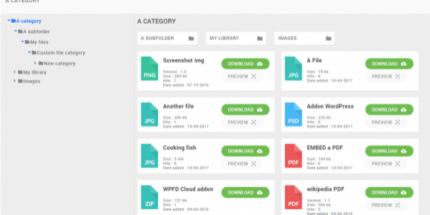
WP File Download is a WordPress plugin for managing and sharing files directly inside your site. It helps you create file categories, upload via drag-and-drop, and insert either a single file or a category into posts and pages with one click. The plugin is designed for speed and responsive display, including multiple responsive themes, while keeping navigation smooth for visitors. It also focuses on discoverability with SEO-friendly file URLs and a full-text search engine. For offsite storage, it connects with popular cloud services and syncs files seamlessly.
Main Features
- File categories — Organize downloads into structured groups for easier browsing.
- Drag-and-drop uploads — Add files quickly without leaving the WordPress editor flow.
- One-click insertion — Insert a file category or a single file directly into content.
- One-click file ordering — Arrange downloads in a predictable order for visitors.
- Four responsive themes — Match the file layout to your WordPress look and feel.
- AJAX navigation — Provide fast public-side browsing without full page reloads.
- SEO file URLs — Use clean, search-friendly links for better indexing.
- Full-text search — Let users find files by searching within file details and content.
- Cloud integrations — Sync with Google Drive, Dropbox, and OneDrive.
- Double-way sync — Keep remote and site copies aligned when changes occur.
Benefits
- Faster content publishing — Upload and insert downloads quickly with minimal setup.
- Better user experience — AJAX navigation and responsive themes improve browsing on all devices.
- Higher engagement — Categories and one-click ordering make it easier to find the right file.
- Improved discoverability — SEO-friendly file URLs and full-text search support search and internal discovery.
- Streamlined storage management — Cloud sync reduces duplication and keeps files organized.
- More reliable access — Remote download and double-way sync help ensure up-to-date content.
Who is it suitable for?
- WooCommerce stores with downloadable products and assets
- Content sites that publish resources, guides, or downloadable media
- Agencies building WordPress websites for clients
- Online schools and course platforms sharing learning materials
- Teams managing documents via Google Drive, Dropbox, or OneDrive
- Bloggers and content creators who want organized, searchable downloads