
Formidable Geolocation 1.5.0
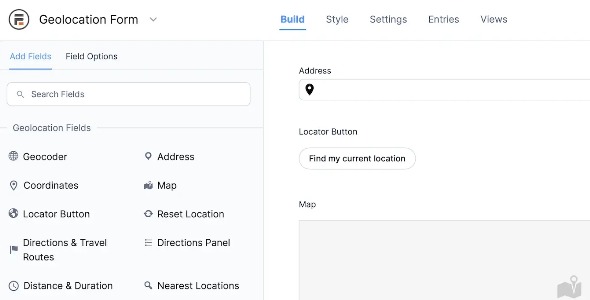
Formidable Geolocation integrates Google Maps API with Formidable forms to collect precise location data directly from users. Get richer insights and tailor experiences based on geographic info, with a seamless, easy-to-use add-on for WordPress. Benefit from smooth mapping, reliable data, and quick setup—unlock location-aware forms today.
Description
Formidable Geolocation is a WordPress plugin add-on for Formidable Forms that integrates the Google Maps API to collect users’ geographic information as they fill out forms. It helps solve the common problem of vague location entries by capturing location data directly from the map experience. With this integration, you can enrich your form submissions with more precise location context and use it to understand where your audience comes from. The plugin is designed to be quick to set up inside your WordPress workflow, keeping the focus on building forms with Elementor or your existing theme setup.
Main Features
- Google Maps API integration — Connects Formidable Forms with Google Maps to enable map-based location input.
- Geolocation field for Formidable — Adds a dedicated location input that users can interact with during form submission.
- User-provided geographic data — Captures location details from the user in a structured way for each entry.
- Map-powered selection — Lets users choose their location through an embedded map experience.
- Works within WordPress — Designed to run smoothly in a WordPress site using Formidable Forms.
- Quick setup process — Provides an easy-to-configure workflow to get location capture up and running.
- Entry-ready location information — Makes geographic data part of your Formidable form submissions for review and use.
Benefits
- Richer insights — Converts basic submissions into location-aware data for clearer reporting.
- Better targeting — Helps you tailor follow-ups and content based on where users are located.
- Improved data quality — Reduces missing or ambiguous location entries by using map selection.
- Stronger UX — Provides an intuitive map interaction that feels natural during form completion.
- Faster workflows — Speeds up configuration so you can deploy location-aware forms with minimal friction.
Who is it suitable for?
- WooCommerce stores collecting customer location for services or delivery regions
- Local business websites running contact, booking, or inquiry forms
- Agencies building location-aware client lead capture forms
- Online schools and training providers accepting applications by region
- Event organizers gathering attendee location for planning and outreach
- Content-driven sites using WordPress and Formidable to segment audiences by geography
