WhatsApp Click to Chat 2.2.12 – Plugin for WordPress

WhatsApp Click to Chat consolidates your team’s WhatsApp accounts into a single, friendly box for WordPress, helping visitors contact you instantly. This plugin boosts engagement by simplifying outreach and improving response times. Easy setup, clean design, and smooth integration make it the smart choice for faster customer support—start chatting with visitors today.
Description
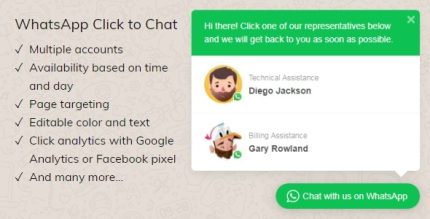
WhatsApp Click to Chat is a WordPress plugin that consolidates your team’s WhatsApp accounts into a single, friendly chat box. Instead of asking visitors to search for the right contact, it presents your available options in one clear place.
For websites built on WordPress, it helps solve the common outreach problem of slow, fragmented messaging by streamlining how people start conversations. With easy setup and a clean, straightforward interface, the plugin supports faster response times and smoother visitor communication.
Main Features
- Unified WhatsApp chat box — Displays your team’s WhatsApp contact options in one compact area.
- Team account consolidation — Groups multiple WhatsApp numbers so visitors don’t have to guess who to message.
- Instant chat initiation — Enables quick access to WhatsApp conversations directly from your site.
- Visitor-friendly layout — Uses a clean design that keeps the call to action easy to find.
- Simple configuration — Quick setup so you can launch without complex steps.
- WordPress integration — Fits into your existing WordPress site experience with minimal disruption.
Benefits
- Faster outreach — Makes it easier for visitors to start a conversation, reducing delays in initial contact.
- Higher engagement — Lowers friction by presenting all team WhatsApp options in one view.
- Better UX — Improves the on-site experience by removing extra steps to find the correct contact.
- Improved response times — Streamlined messaging supports quicker follow-ups from your team.
- More organized support — Helps route chats consistently by keeping contact choices together.
Who is it suitable for?
- WooCommerce stores that handle customer questions via WhatsApp
- Service businesses that need quick lead follow-up
- Agencies managing multiple team members or departments
- Landing pages and business websites focused on contact and conversions
- Online communities or membership sites that rely on direct messaging
- Content creators and consultants who support clients through WhatsApp